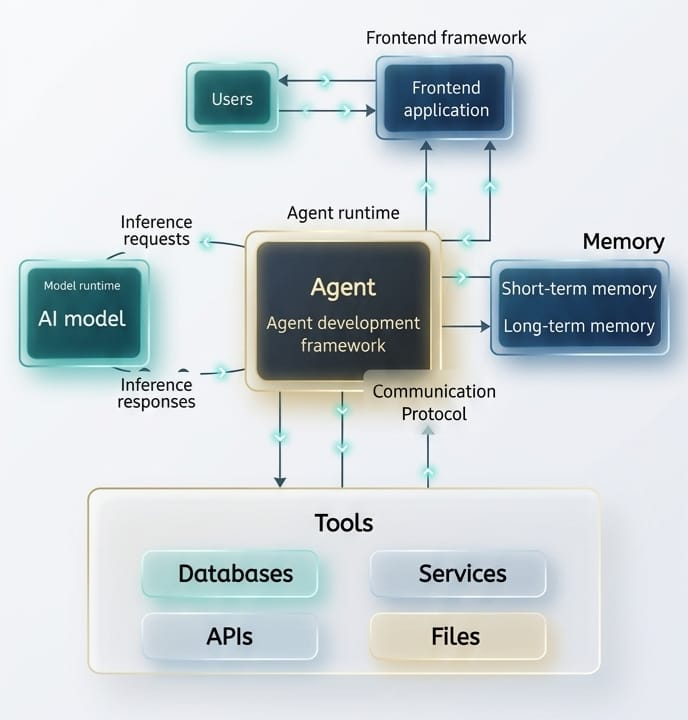
An AI agent is an autonomous digital worker or software system that analyze, plan, and execute tasks independently on behalf of users. You give it a goal, and it figures out the steps, uses tools and works until the job is done.
AI Agent Vs Agentic AI
AI agents are individual, focused software components designed to perform specific tasks with limited autonomy, while Agentic AI is the broader framework of systems using reasoning, planning, and multi-agent coordination to achieve complex, end-to-end goals with minimal supervision. Think of AI agents as specialized assistants (e.g., a chatbot), while agentic AI acts as the proactive, autonomous “manager” orchestrating them.
Example: Say the goal is – “Book a flight to tokyo for my vacation in June”.
An AI agent would:
- Check your calendar for free dates in June
- Use a Flight API to find the cheapest options
- Compare the options against your known preferences (e.g non-stop only)
- Send you an email: “I found three flights. Click here to authorize me to buy the Rs. 10000 one on 12th June”
Components / Architecture of AI Agents
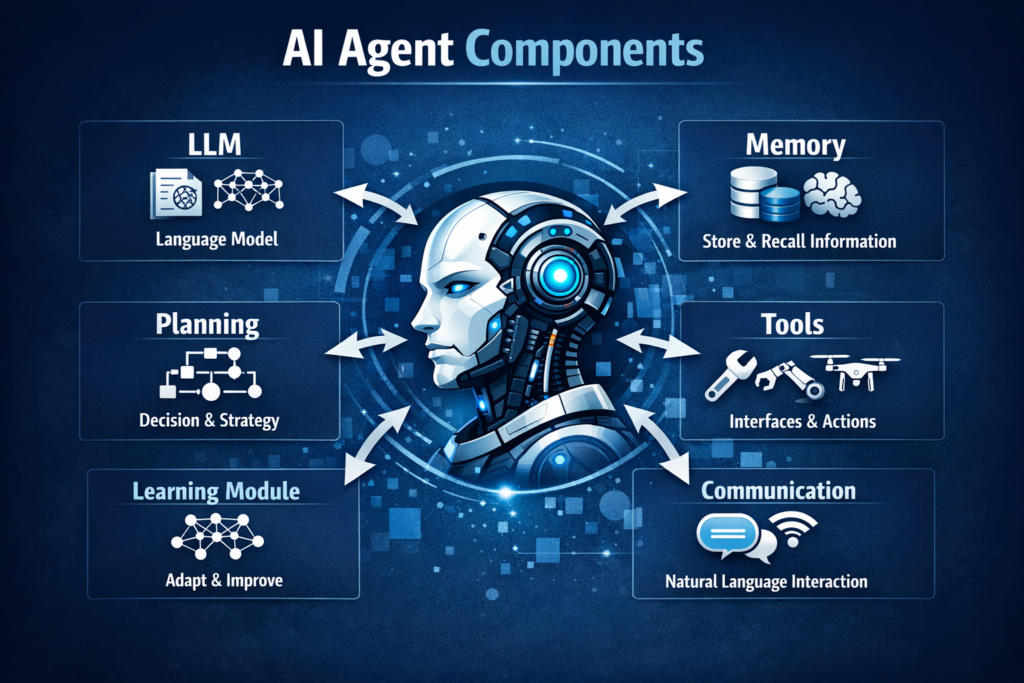
To be considered an AI agent, a system generally needs these four components working together-
AI Agent Development Flow
- LLM (The Brain): This is the core reasoning engine. It decides what to do next based on the instruction. Eg. GTP-5, Claude, Gemini etc.
- Planning: The ability to breaks a big task into small sub-tasks or steps like seen in the ticketing booking example above.
- Memory: Short-term – Remembers what happened three steps ago in the current task (i.e. the context). Long-term – Can pull information from a database or past projects.
- Tools (Action): External APIs or execute code that allow the agent to interact with the world. E.g. Searching the web, sending emails, triggering other process, updating data, querying a SQL database etc.
AI Agent Development Workflow
You can build an AI agent by combining a capable language model, well-defined tools, clear instructions, and an orchestration pattern that matches your workflow complexity. Start small with a single, well-scoped task, then expand capabilities over time.
1. Define the Persona and Goal
Be hyper-specific in defining goal. Instead of “a research assistant”, define it as: “An agent that monitors tech news, filters for semiconductor updates and summarize them into a slack channel daily”.
2. Choose AI Agent Framework
Leading frameworks for building LLM applications include LangChain for versatile orchestration, LlamaIndex for data-focused RAG, and CrewAI or AutoGen for multi-agent workflows.
| Framework | Description |
| LangGraph | Best for complex, stateful agents where you need high control over the flow |
| CrewAI | The “go-to” for multi-agent systems where agents collaborate. |
| Microsoft Autogen | Excellent for conversational multi-agent patterns |
| OpenAI / Claude SDKs | For simple, single-agent “GPT-native” applications |
| LlmaIndex | Specialized in connecting private data sources (RAG) to LLMs. |
| Hugging Face Transformers | The fundamental library for accessing and working with open-source LLMs. |
| Zapier, n8n | No-code tools |
3. Define Tools and Actions
Define “Functions” or “Tools” the agent can call. E.g. connect your agent to a search_web function and save_to_notion function. Equip the agent with external capabilities, such as web searching, database access, or calculator functions.
4. Add Guardrails and Test
Guardrails for AI agents are essential safety, security, and compliance frameworks that intercept inputs and outputs to prevent PII leakage, block prompt injection, and enforce behavioral constraints. They operate by validating user prompts, agent reasoning, tool calls, and final responses to ensure safe, ethical, and accurate operations in production environments
Implement safety boundaries to prevent improper actions and rigorously test the agent in a controlled “playground” environment before deployment. Agents can “hallucinate” or loop. User tools like LangSmith or AgentOps to track every steps the agent takes.
5. Deploy and Monitor
Deploy the agent as a microservice API or chatbot, continuously tracking performance and refining prompts or tools.
Practical Example: Simple Research and Save AI agent using CrewAI
This is scenerio we will create a three-agent system:
- The Researcher: Crawl the internet for a specific topic
- The Writer: Processes the research into a polished summary
- Editor: Review the polished summary for any grammatical errors, sentence flow and accuracy
Python Implementation
# Prerequisite Setup
pip install crewai crewai[tools]
# research_and_save_agent.py
import os
from crewai import Agent, Task, Crew, Process

# Configuration - replace with your actual OpenAI API key
os.environ["OPENAI_API_KEY"] = ""

MODEL = "4o-mini"   # Change to "gpt-3.5-turbo" if 4o-mini is unavailable
TOPIC = "AI Agents in Healthcare"

# Agents
researcher = Agent(
    role="Senior Tech Researcher",
    goal="Uncover and analyse the most important developments in {topic}",
    backstory=(
        "You are a world-class technology researcher with deep expertise across "
        "AI, life sciences, and digital health. You excel at identifying "
        "emerging trends, evaluating their real-world impact, and distilling "
        "dense information into clear, evidence-based insights."
    ),
    verbose=True,
    allow_delegation=False,
    llm=MODEL,
)

writer = Agent(
    role="Tech Content Strategist",
    goal="Transform research findings into a compelling, concise summary about {topic}",
    backstory=(
        "You are an experienced science communicator who bridges the gap between "
        "complex research and business decision-makers. Your writing is clear, "
        "structured, and always grounded in the facts provided by the researcher."
    ),
    verbose=False,
    allow_delegation=False,
    llm=MODEL,
)

editor = Agent(
    role="Senior Editor",
    goal="Polish the summary about {topic} to be publication-ready",
    backstory=(
        "You are a meticulous editor with a sharp eye for clarity, flow, and "
        "accuracy. You ensure the final output is free of redundancy, well-structured "
        "in clean Markdown, and suitable for a professional newsletter audience."
    ),
    verbose=False,
    allow_delegation=False,
    llm=MODEL,
)

# Tasks
research_task = Task(
    description=(
        "Conduct a comprehensive analysis of the current state of {topic} in 2026. "
        "Focus on: (1) the most significant recent breakthroughs, (2) leading companies "
        "or research groups, (3) real-world deployments, and (4) key challenges that "
        "remain unsolved."
    ),
    expected_output=(
        "A structured report containing:\n"
        "- Top 5 breakthroughs (bulleted, one sentence each)\n"
        "- 3-5 key players (organisations or projects)\n"
        "- 2-3 unsolved challenges\n"
        "All written in plain English with no fluff."
    ),
    agent=researcher,
)

writing_task = Task(
    description=(
        "Using ONLY the researcher's findings above, write a 3-paragraph executive "
        "summary about {topic} suitable for a healthcare technology newsletter. "
        "Paragraph 1: current landscape. Paragraph 2: top breakthroughs. "
        "Paragraph 3: outlook and challenges."
    ),
    expected_output=(
        "A 3-paragraph Markdown summary (~250-300 words). "
        "Include a # heading and use **bold** for key terms."
    ),
    agent=writer,
    context=[research_task],   # writer receives researcher's output
)

editing_task = Task(
    description=(
        "Review and polish the writer's summary about {topic}. Fix any grammatical "
        "issues, improve sentence flow, remove redundancy, and ensure the Markdown "
        "formatting is consistent and clean."
    ),
    expected_output=(
        "The final, publication-ready Markdown summary. "
        "Do NOT add new content — only refine what the writer produced."
    ),
    agent=editor,
    context=[writing_task],    # editor receives writer's output
)

# Crew Definition
crew = Crew(
    agents=[researcher, writer, editor],
    tasks=[research_task, writing_task, editing_task],
    process=Process.sequential,
    verbose=False,
)

# Run
print(f"\n Starting research crew for topic: '{TOPIC}'\n")
try:
    result = crew.kickoff(inputs={"topic": TOPIC})
    print("\n" + "=" * 60)
    print("FINAL OUTPUT")
    print("=" * 60)
    print(result)
except Exception as e:
    print(f"\n Crew execution failed: {e}")
# Execute the Code
python research_and_save_agent.pyUnlike a simple prompt in ChatGPT, this code creates an autonomous loop:
Role Playing: By defining a backstory, the LLM adopts a specific “mental model” which improves output quality.
Sequential Reasoning: The writer doesn’t just guess; it waits for the researcher to provide the data, mimicking a real-world office workflow.
Input Variable: The {topic} allows you to reuse this code for any subject, making it a scalable tool.
That’s it! We have successfully created our first Agentic AI application. Keep Learning!
How Agentic AI System Works
Following diagram explains the workflow of an Agentic AI system.